Tokenizer Inflation: Why $/1M Token Prices Are Not Comparable Across LLMs
The same file can become up to 73% more tokens on one frontier model than another, so a $/1M token price is only comparable after you adjust for each model's tokenizer.
Key takeaways
- A token is not a fixed unit of text. Each model's tokenizer cuts the same file into a different number of pieces, and you pay per piece.
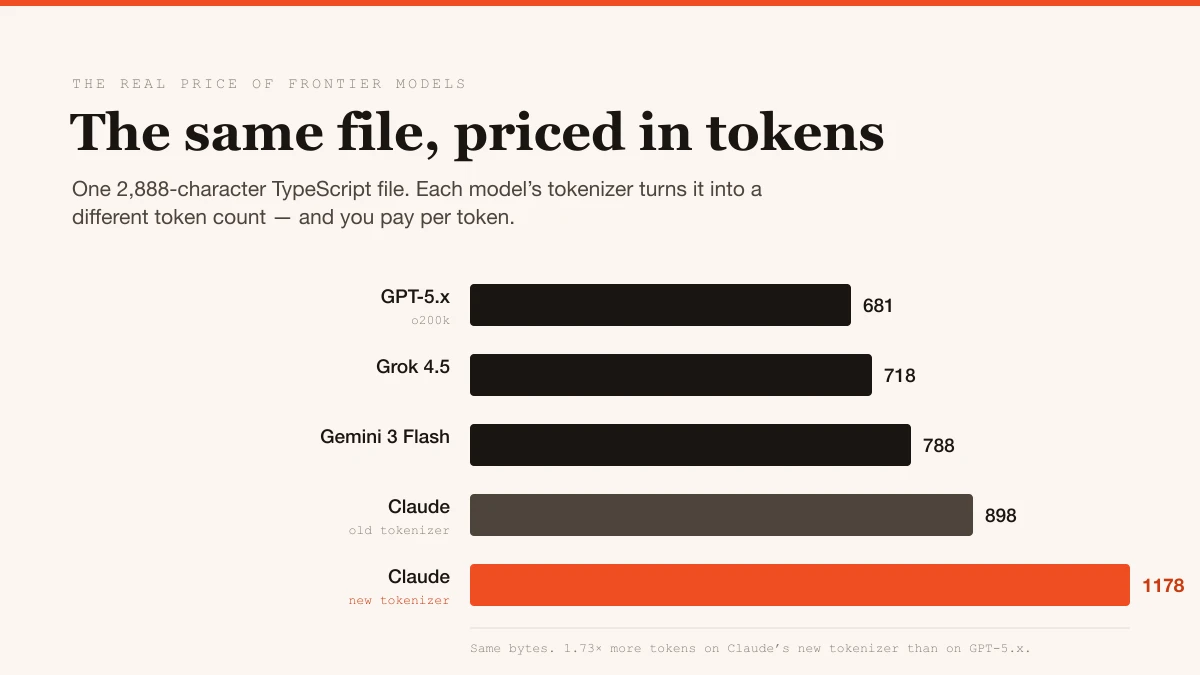
- Playcode measured identical files across frontier tokenizers: one 2,888-character TypeScript file is 681 tokens on GPT-5.x's o200k and 1,178 tokens on Claude's newest tokenizer, a 1.73x gap before any price difference.
- A tokenizer change is a silent price change. Claude Opus 4.6 and Opus 4.8 share the same $5.00 / $25.00 sticker, yet the newer tokenizer produces roughly 29-32% more tokens for the same code.
- The measured range is bounded: about 1.4x on English prose, 1.50x to 1.73x on code, roughly 1.44x to 1.53x on Chinese. Claims of 2x to 4x are not supported by these measurements.
- The number that survives contact with your invoice is cost per task, not dollars per million tokens.
Why is $/1M tokens a broken comparison?
Every model bill is two numbers multiplied together: the tokens your content becomes, times the price per token. Pricing pages publish the second number and treat the first as a constant. It is not a constant. It is a property of the tokenizer, the component that chops your text into billable pieces, and it varies by vendor, by model generation, and by content type.
Two models can advertise the same $5.00 per 1M input tokens and hand you different bills for the same paragraph, because one turns that paragraph into more tokens than the other. Nobody prints tokens-per-content on a rate card, so nobody compares it.
What did the measurements actually find?
Playcode ran 16 identical fixtures (English prose, HTML, TypeScript, Rust, Python, JSON tool schemas, Chinese text, a real agent system prompt) through each provider's own token counting endpoint, then verified the counts against real billed requests. Two findings stand out.
First, a same-sticker stealth hike. Claude Opus 4.6 and 4.8 carry an identical $5.00 / $25.00 rate card, but 4.8 ships a new tokenizer that turns the same code into about 29-32% more tokens: +31% on TypeScript (898 to 1,178 tokens), +29% on Rust, roughly +32% blended across a realistic agent request. Same price per token, materially higher price per task, and no line item anywhere.
Second, the gap is widest on code. Against GPT's o200k tokenizer as the 1.00x ruler, Claude's new tokenizer lands at 1.50x on Python, 1.52x on JavaScript, 1.58x on Rust and 1.73x on TypeScript. English prose is a milder 1.40x. If you run an AI coding agent, your payload is mostly code, schemas and system prompt, which sits at the expensive end of that range.
How does this change effective prices?
Multiply the headline price by the measured divergence and the league table reorders. On Playcode's blended coding workload, Opus 4.8's $5.00 / $25.00 sticker behaves like an effective $7.50 / $37.50 against the o200k ruler. Fable 5's $10 / $50 sticker behaves like $15 / $75. Gemini 3 Flash keeps its cost lead: its tokenizer runs slightly heavier than GPT's (1.09x) but the $0.50 / $3.00 headline absorbs it.
Intro pricing adds a wrinkle. Sonnet 5 launched at $2.00 / $10.00, below Sonnet 4.6's $3.00 / $15.00, but that price runs only through August 31, 2026. When it reverts to $3.00 / $15.00, the roughly +32% token inflation stays, so the same code will cost about a third more than on 4.6 at an identical sticker.
One independent data point in the same direction: Ploy published a production migration in which the same builds consumed 1.70M input tokens on GPT-5.6 Sol versus 2.60M on Claude Opus 4.8, roughly 35% fewer. That is a real bill, blending tokenizer efficiency and model verbosity.
How do you compare LLM costs correctly?
- Compare on your own content. Run a representative sample of your real prompts, code and schemas through each provider's token counter before trusting any rate card.
- Watch for tokenizer changes at the same price. A new model generation with an unchanged sticker can still be a 30% price increase.
- Measure dollars per task. Token counts from the provider's usage field are the ground truth, and per-task cost folds tokenizer and verbosity into one comparable number.
Here is the part that matters for anyone selling AI features: tokenizer inflation flows straight into your unit economics without any announcement. If your margin model assumes a fixed cost per user action, a quiet tokenizer swap can move your gross margin by several points while your pricing page and your provider's pricing page both look unchanged. Treat the tokenizer version as a pricing variable, pin the effective per-task cost in your model, and re-run the numbers whenever a provider ships a new model generation. You can model effective per-task costs and margins across providers in Calcaas.
The sticker price is the opening line of a negotiation your tokenizer finishes.
Frequently asked questions
What is tokenizer inflation?
Tokenizer inflation is when a newer tokenizer splits the same text or code into more tokens than before. Since providers bill per token, the same work costs more even when the listed price per million tokens is unchanged.
Why does the same code cost more tokens on some models?
Each vendor trains its own tokenizer, and they compress different content differently. GPT's o200k is unusually efficient on TypeScript and web code, while Claude's newest tokenizer produces up to 1.73x more tokens on the same file.
Is a cheaper $/1M token price always cheaper in practice?
No. A model with a lower sticker can produce more tokens for the same content, erasing the discount. Effective cost is the sticker price multiplied by the tokenizer divergence on your specific workload.
How do I compare LLM costs correctly?
Run a representative sample of your real workload through each provider's token counter, then compare dollars per task rather than dollars per million tokens. Re-test whenever a provider releases a new model or tokenizer. Note: place this JSON-LD in a <script type="application/ld+json"> tag in the page head.
More from the blog
 LLM Economics
Jevons Paradox in AI: Why Cheaper Tokens Mean Bigger Bills
Jevons paradox in AI means that when tokens get cheaper, people use so many more that total spend rises. If price per task halves from $0.10 to $0.05, volume must double just to hold spend flat, and a tripling lifts spend 50 percent.
 LLM Economics
OpenRouter Pricing: What a Gateway Really Costs
OpenRouter pricing is the underlying model rate plus whatever platform fee the gateway adds, so the real question is net cost. Say a 5 percent fee on $10,000 of monthly tokens adds $500, and routing 15 percent of spend to cheaper models saves $1,500, a net gain of $1,000.
 LLM Economics
MoE Cost per Token: Why Active Parameters Rule
For a mixture-of-experts model, compute per token follows active parameters, while the GPUs you must rent follow total parameters. A model with 40B active out of 400B total can be cheaper per token than a dense 70B at high utilization, and more expensive when traffic is thin.
Pricing math, in your inbox.
One short note a week on AI pricing, token economics, and margin. No spam, unsubscribe anytime.